
C.O.S.M.O, Bringing Order to Cyber Operations
AI security operations on your own server

C.O.S.M.O Bot does the work. You approve it.

It sorts every alert, scores each one with its reasons and writes every team’s work order, ready to paste in. Nothing changes until a person presses Approve.

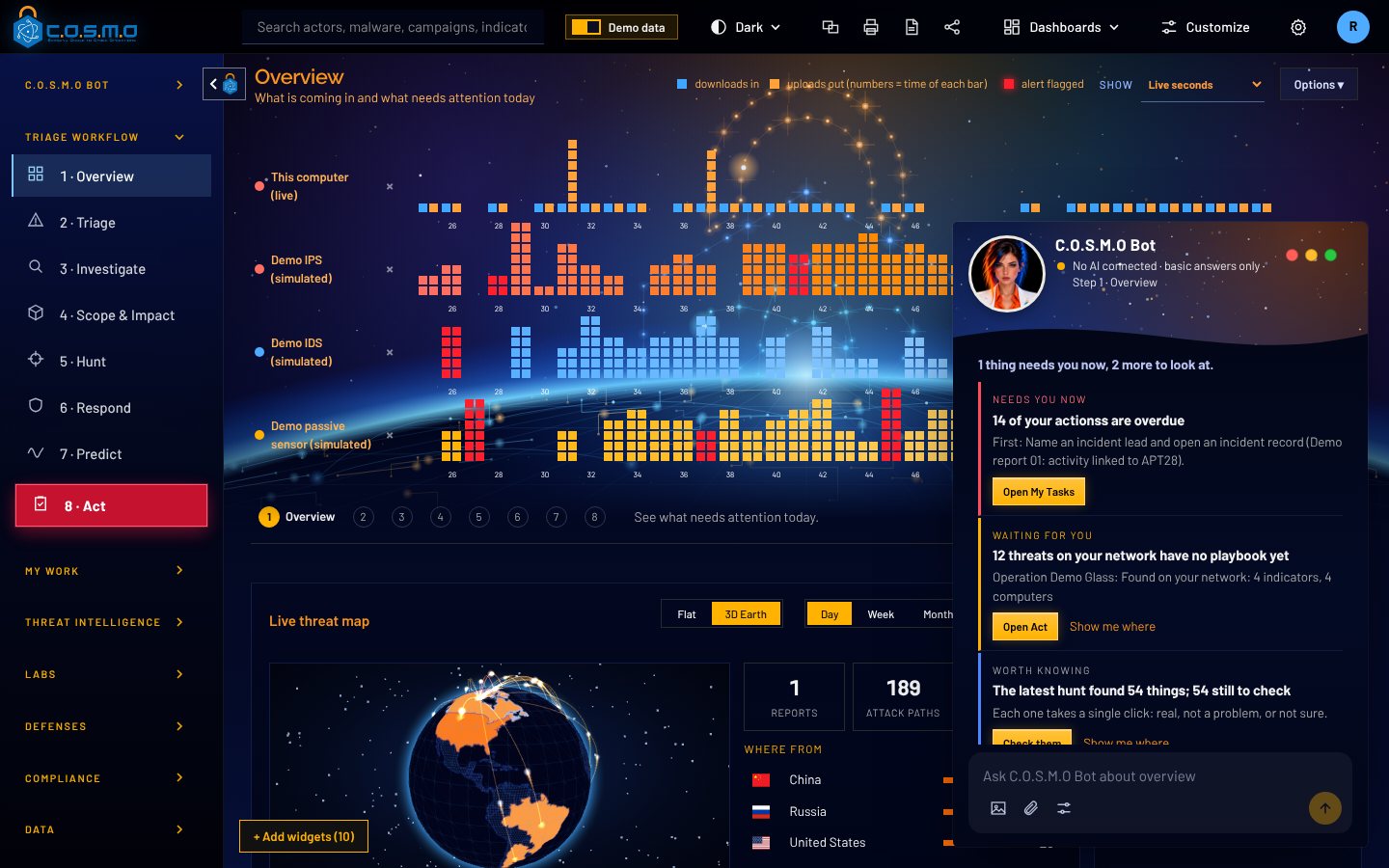
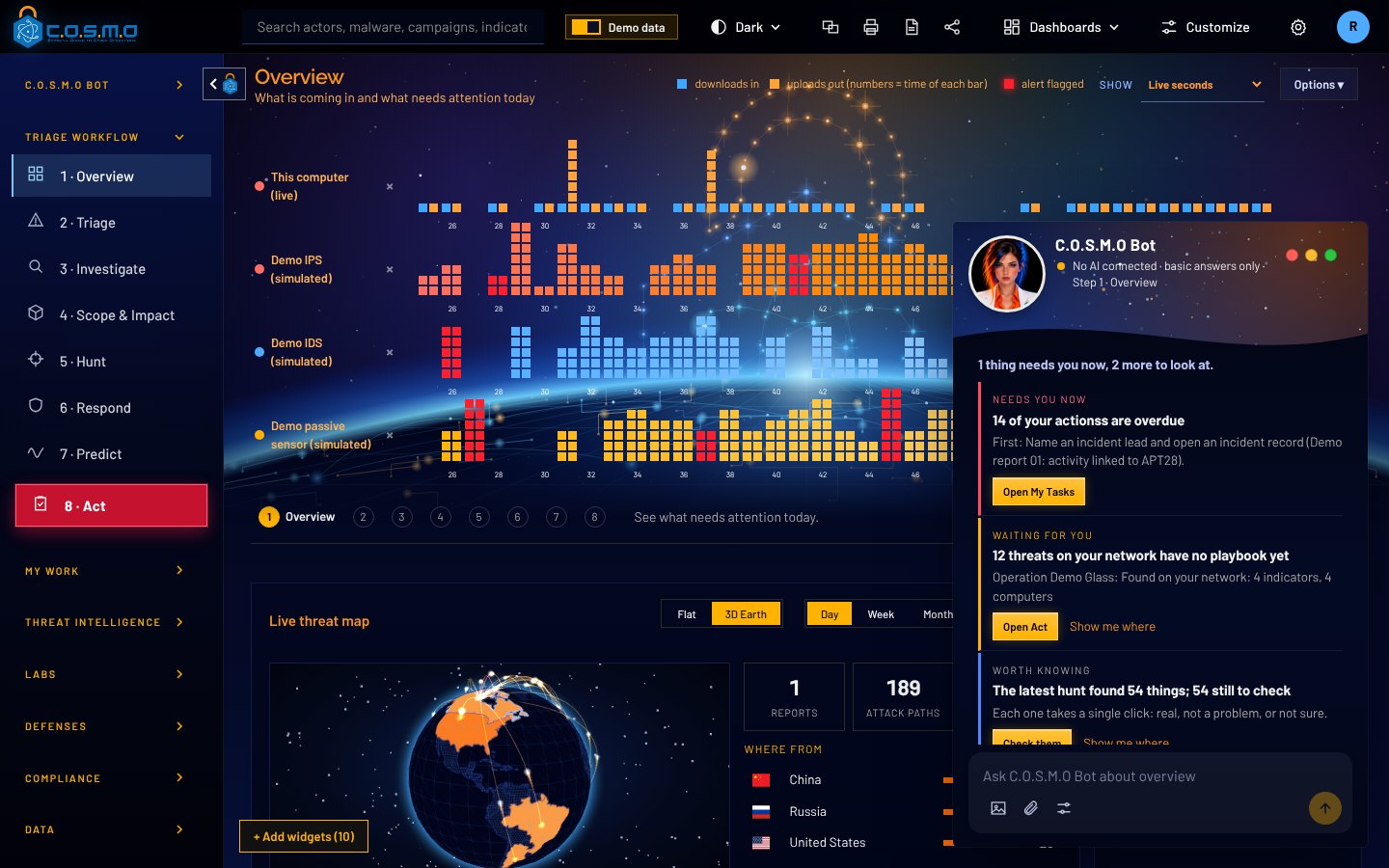
The C.O.S.M.O Overview with C.O.S.M.O Bot open: live traffic bars for each source over a glowing Earth, the threat map on a 3D globe, and the bot listing what needs attention now.
C.O.S.M.O Bot12 threats on your network have no playbook yet.Raised on its own, demo data
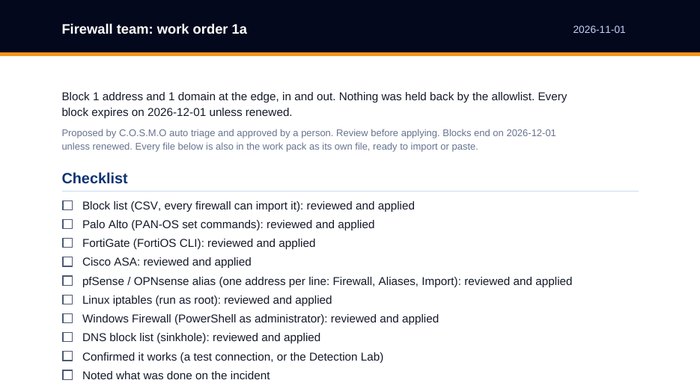
The top of a real C.O.S.M.O work order PDF for the firewall team: what to block, and a checklist for Palo Alto, FortiGate, Cisco ASA, pfSense, Linux and Windows firewalls.
  • Built by Cypher, LLC
  • SDVOSB
  • Runs on your own server
  • Works offline
  • Available through Carahsoft

Watch the bot work

C.O.S.M.O Bot does the work.
You approve it.

Five real screens from C.O.S.M.O, in the order the bot works. The numbers point at what it is doing.

01/ 05

It tells you what needs you.

Open C.O.S.M.O and the bot is already on the page, with what needs a person today, most urgent first.
C.O.S.M.O
C.O.S.M.O screen: It tells you what needs you.
  1. 1C.O.S.M.O Bot sits beside every page and knows which step you are on.
  2. 2It raises what needs you on its own: overdue actions, threats with no playbook, hunt results.
  3. 3One button takes you straight to the work.
  4. 4Ask it anything about the page you are looking at.
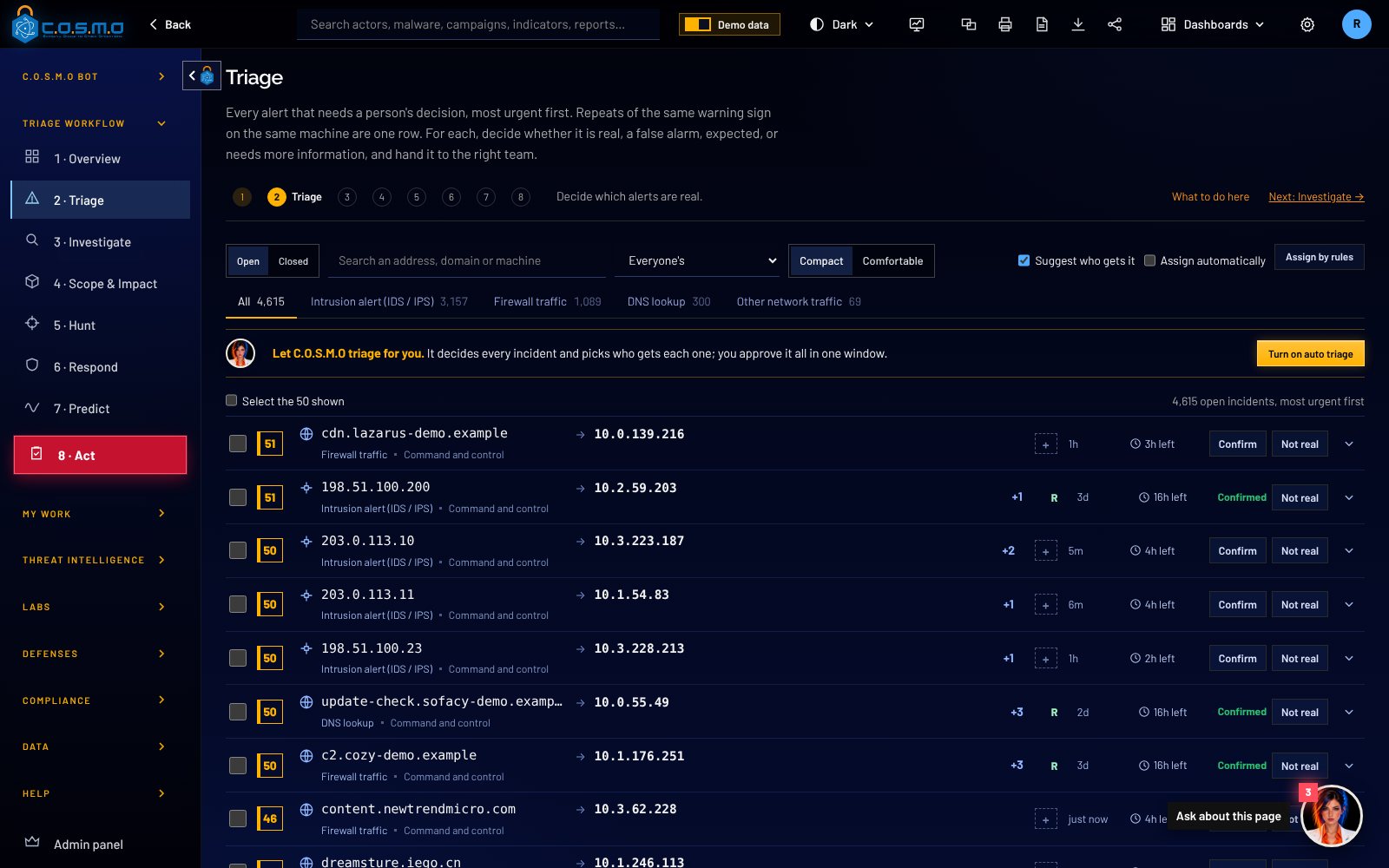
02/ 05

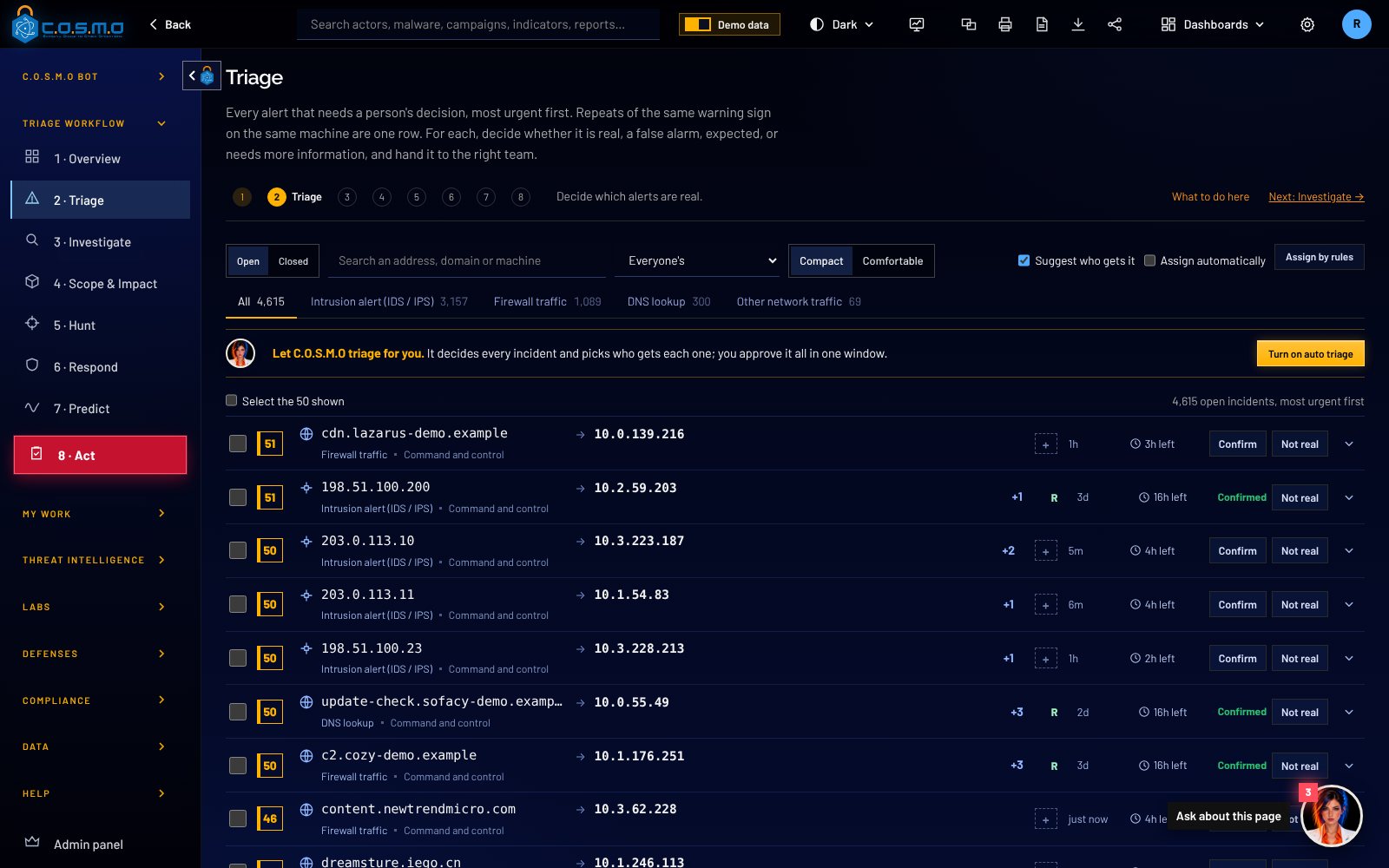
It offers to work the whole queue.

Thousands of alerts, grouped so each machine needs one decision. One click hands the queue to the bot.

C.O.S.M.O
C.O.S.M.O screen: It offers to work the whole queue.
  1. 1The eight-step workflow, from Overview to Act.
  2. 2Every incident carries a score you can open to see each point.
  3. 3"Let C.O.S.M.O triage for you": it decides every incident and picks who gets each one.
  4. 4Turn on auto triage. Nothing changes until a person approves.
03/ 05

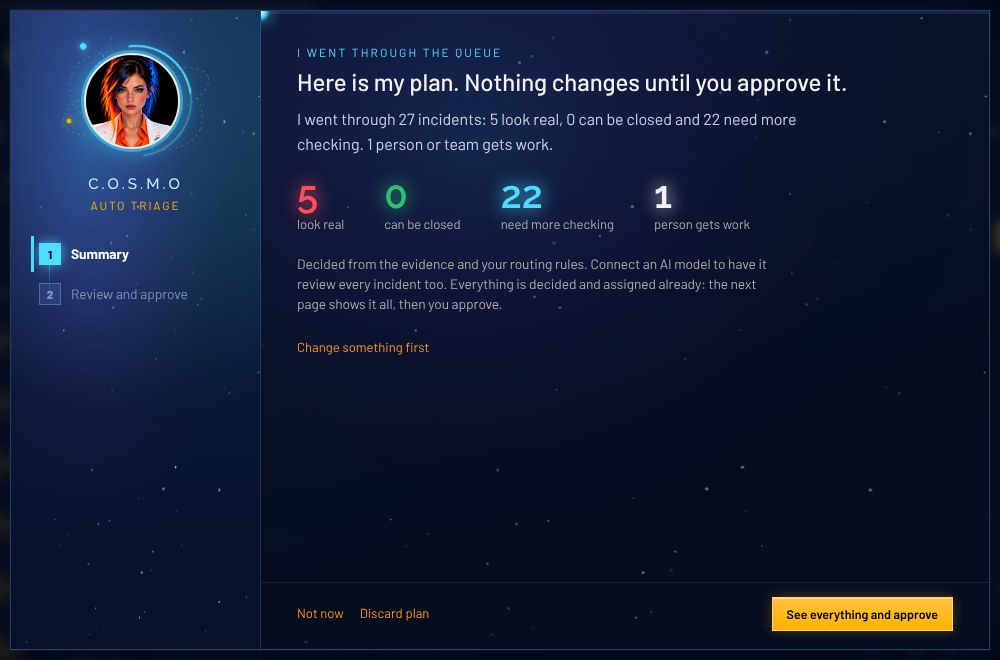
It comes back with a plan.

The bot goes through every waiting incident and says what it decided, in plain English.

C.O.S.M.O
C.O.S.M.O screen: It comes back with a plan.
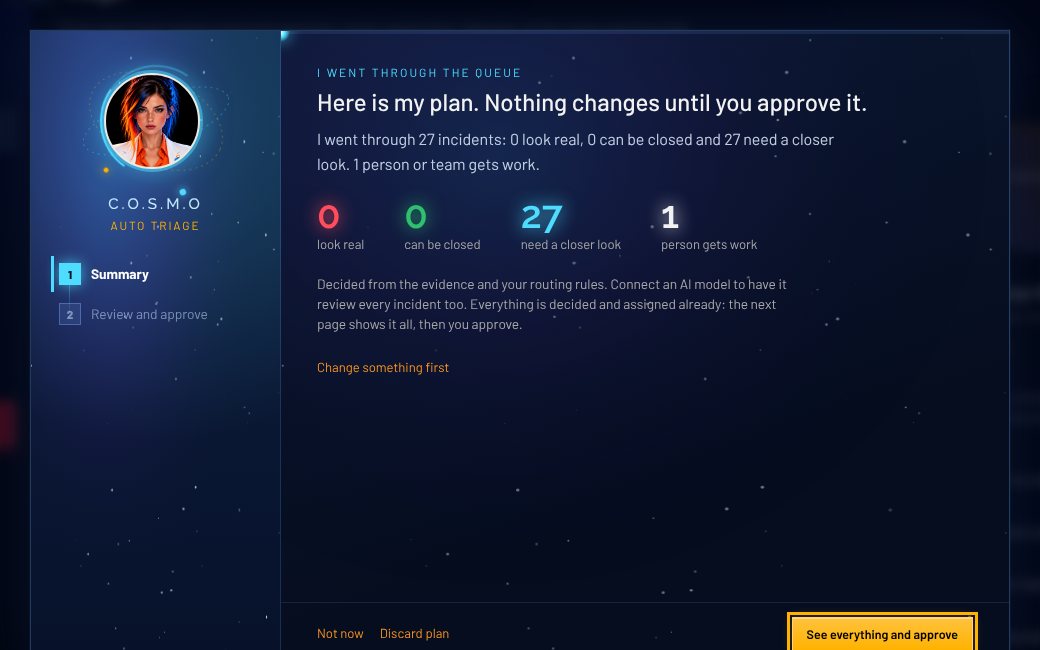
  1. 1"Here is my plan. Nothing changes until you approve it."
  2. 2Real, can be closed, needs more checking, and who gets work, counted.
  3. 3Decided from the evidence and your routing rules, with or without an AI model connected.
  4. 4One button to see everything before you approve.
04/ 05

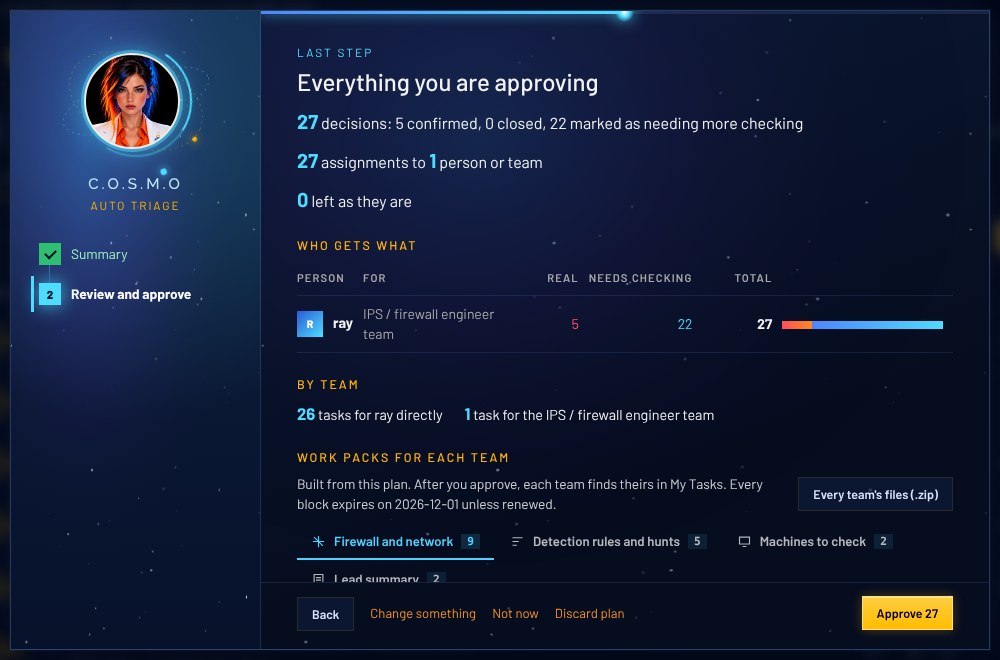
You see everything you are approving.

Every decision, every assignment and every team's work pack, on one page.

C.O.S.M.O
C.O.S.M.O screen: You see everything you are approving.
  1. 1Every decision counted, nothing hidden.
  2. 2Who gets what: each person and team, with their load.
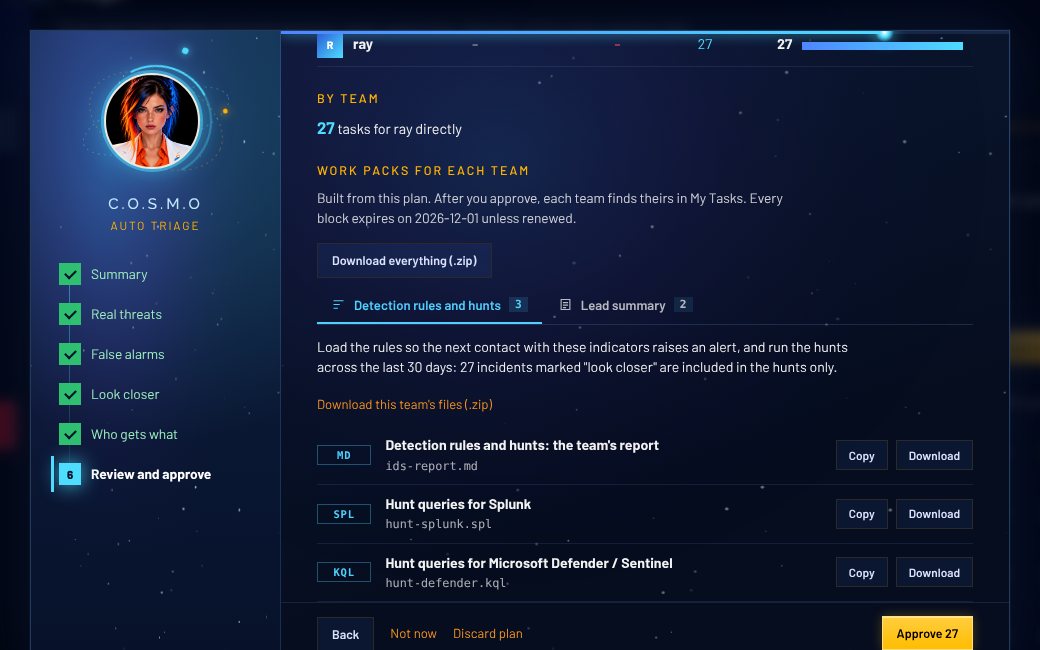
  3. 3A work pack for each team, built from this plan.
  4. 4You press Approve. Each change is written in your name.
05/ 05

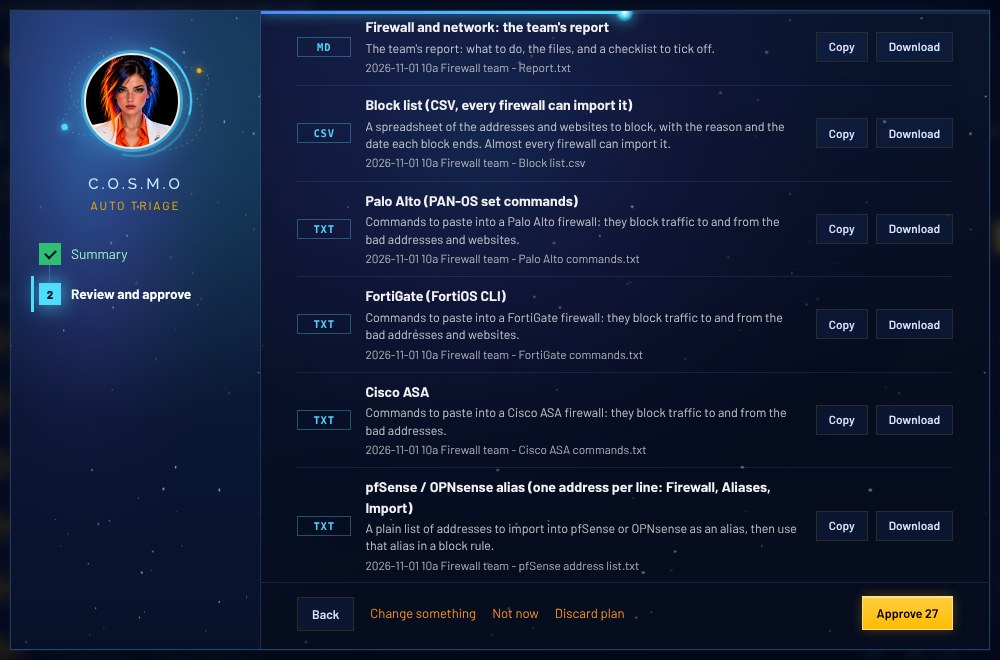
Each team gets work it can paste in.

Firewall commands, detection rules, searches and a PDF work order for every team, ready to copy or download.

C.O.S.M.O
C.O.S.M.O screen: Each team gets work it can paste in.
  1. 1A block list every firewall can import, with the reason and an end date for each block.
  2. 2Ready-to-paste commands for Palo Alto, FortiGate, Cisco ASA, pfSense, Linux and Windows firewalls.
  3. 3Copy or download each file, named with the date and the batch.
  4. 4Approve the lot in one press.

Real C.O.S.M.O screens with fictional demo data. Without an AI model connected the bot still decides from the evidence and your rules.

Before and after

Same morning. Two very different jobs.

What an analyst does by hand compared with what C.O.S.M.O Bot does
TaskBy handWith C.O.S.M.O Bot
Overnight alertsOpen each one and read itRepeats on the same machine become one incident
Is it real?A judgment call, notes in a spreadsheetA score with every reason and its points, and what was checked and ruled out
Who takes it?Ask around who has timeThe person on the right team with the least open work
Firewall blocksWrite commands for each make, one by oneCommands for six makes, ready to paste, your own networks left out
DetectionWrite rules and searches from scratchSuricata, Sigma, YARA, Splunk and Defender, built by code and checked
PaperworkWrite it up and email each teamA PDF work order per team, waiting in My Tasks
The recordPiece together who changed whatEach change written in the approver’s name
Your partAll of the aboveRead one summary. Press Approve.

We do not quote hours saved: that depends on your queue. Ask us to run a demo on data like yours.

Every workflow, side by side

The bot does the legwork. People make the calls.

C.O.S.M.O Bot does itA person decides

Auto triage

01
C.O.S.M.O Bot

Sorts the whole queue, most urgent first.

Repeats are grouped. Each incident gets a score, a suggestion and the team it belongs to.

The Triage list in C.O.S.M.O: incidents most urgent first, each with a score, what the machine is for, a suggestion and who should get it.
02
C.O.S.M.O Bot

Shows why every score is what it is.

Your threat library, the flaws attackers use now, your own firewall rules and how the machine normally behaves.

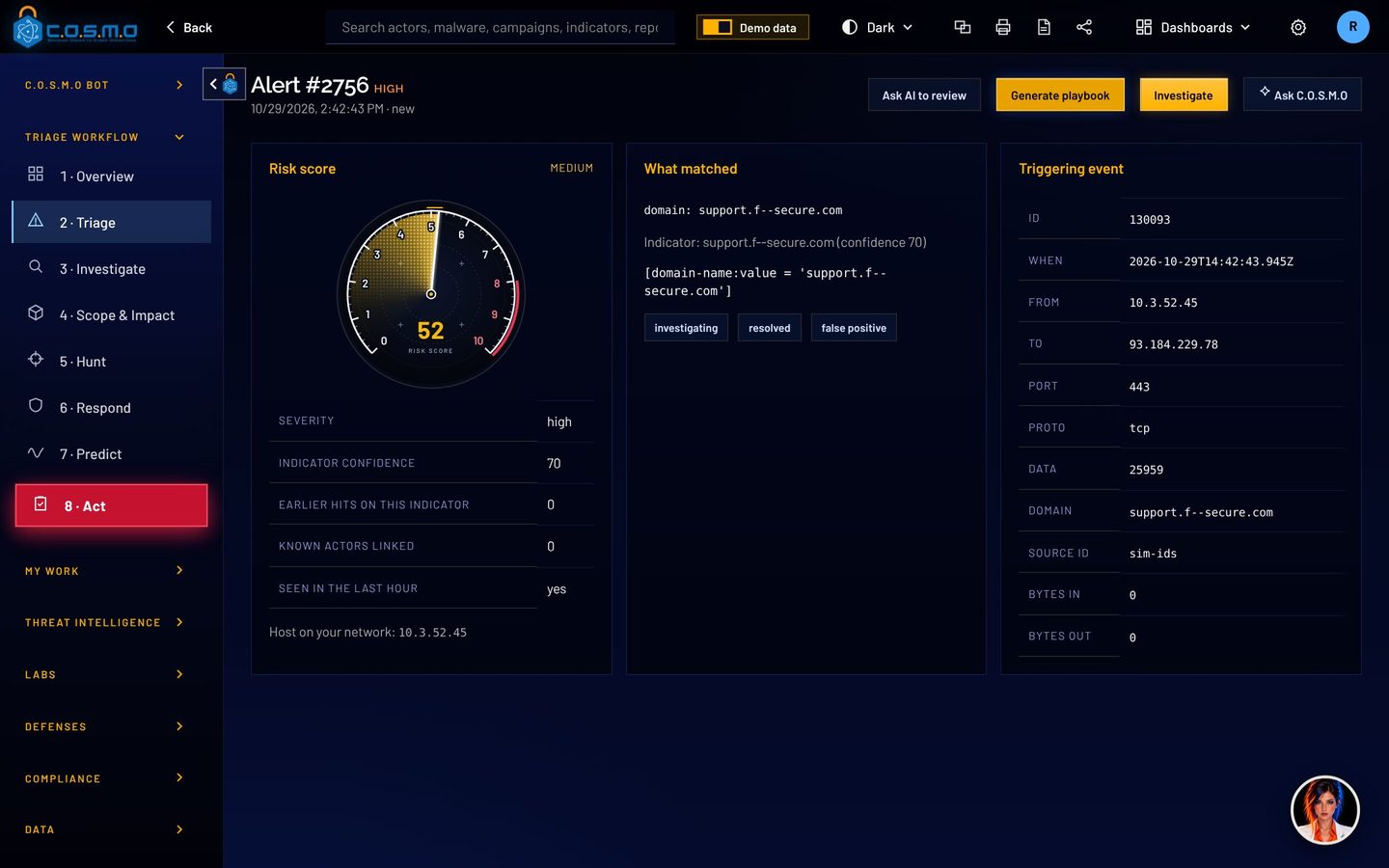
An alert page: a risk score gauge, the facts behind it, what matched and the network event that triggered it.
03
C.O.S.M.O Bot

Writes the plan: a decision and an owner for each.

Real, not real, expected and harmless, or needs more checking. Up to 40 incidents in one plan.

The auto triage window with the C.O.S.M.O Bot portrait: here is my plan, nothing changes until you approve it, with counts for each decision.
04
You

Read one window. Press Approve.

Every change and every team’s files in one place. Leave items out or swap people first if you like.

The review step of auto triage: work packs for each team with Copy and Download, and the Approve button.

Work packs

05
C.O.S.M.O Bot

Hands each team a work order PDF.

What to do, a checklist, then every rule and search with a line on what it is for.

The top of a real work order PDF for the firewall team.
06
Your teams

Pick up their work, with owners and due times.

Each team sees its workload in Act. Each person finds their pack in My Tasks.

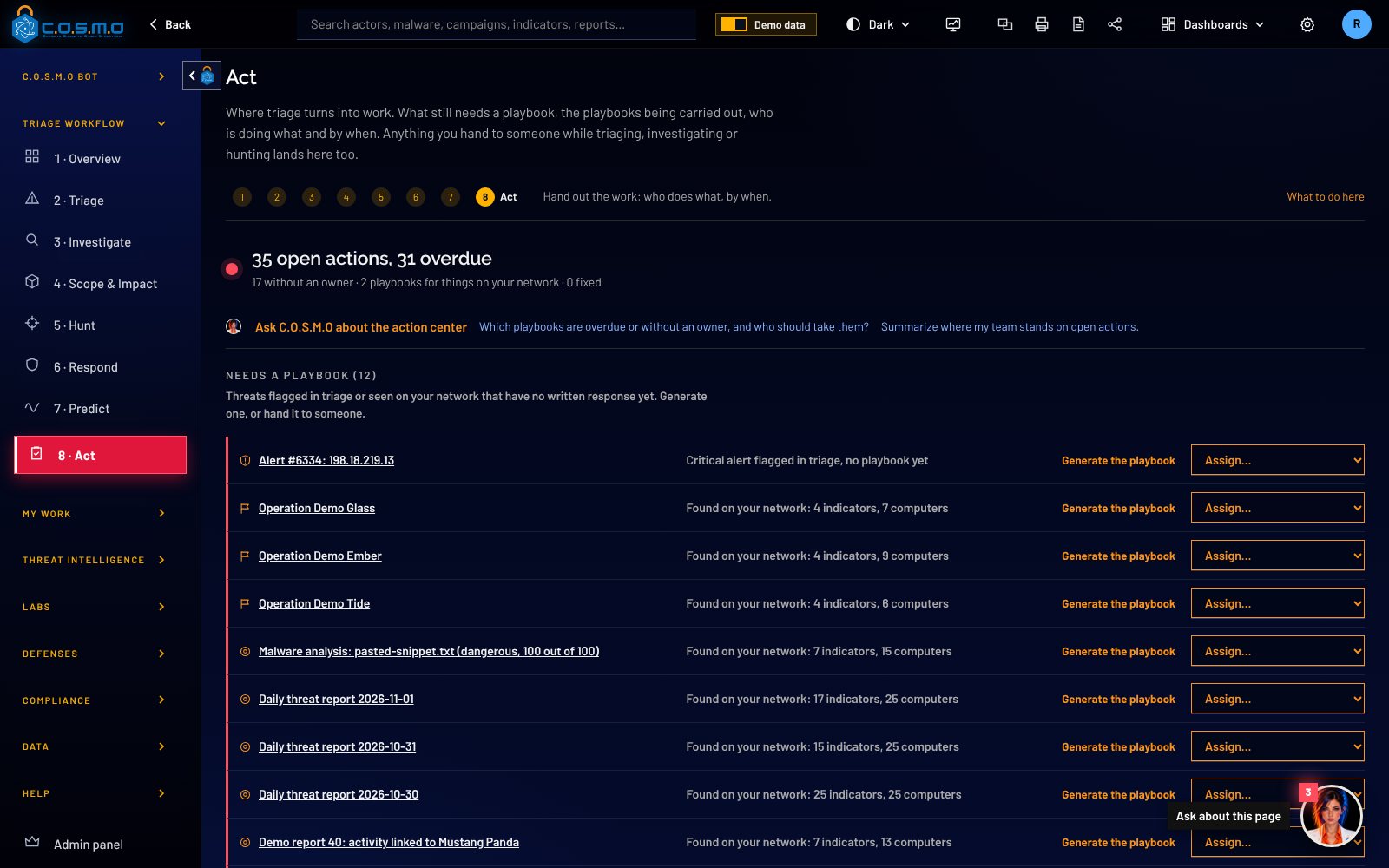
Act: what still needs a playbook, each team's workload and who does what by when.

Investigate and respond

07
C.O.S.M.O Bot

Lays out the checks and how to decide each one.

Things worth a look are marked one by one. The timeline of decisions is kept for the record.

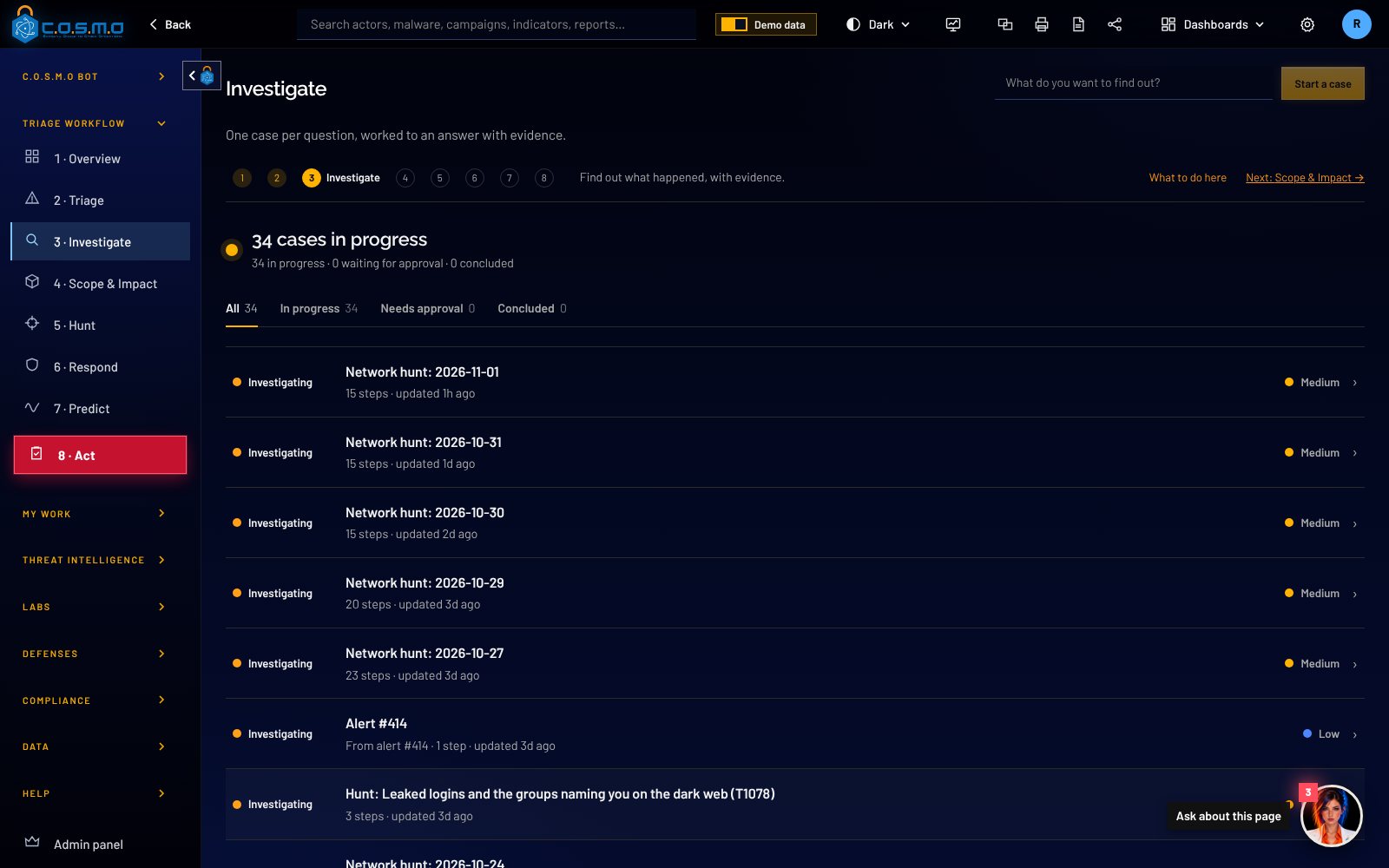
A case in Investigate: each check to run, how to decide, and the things worth a look marked one by one.
08
You

Approve each containment step.

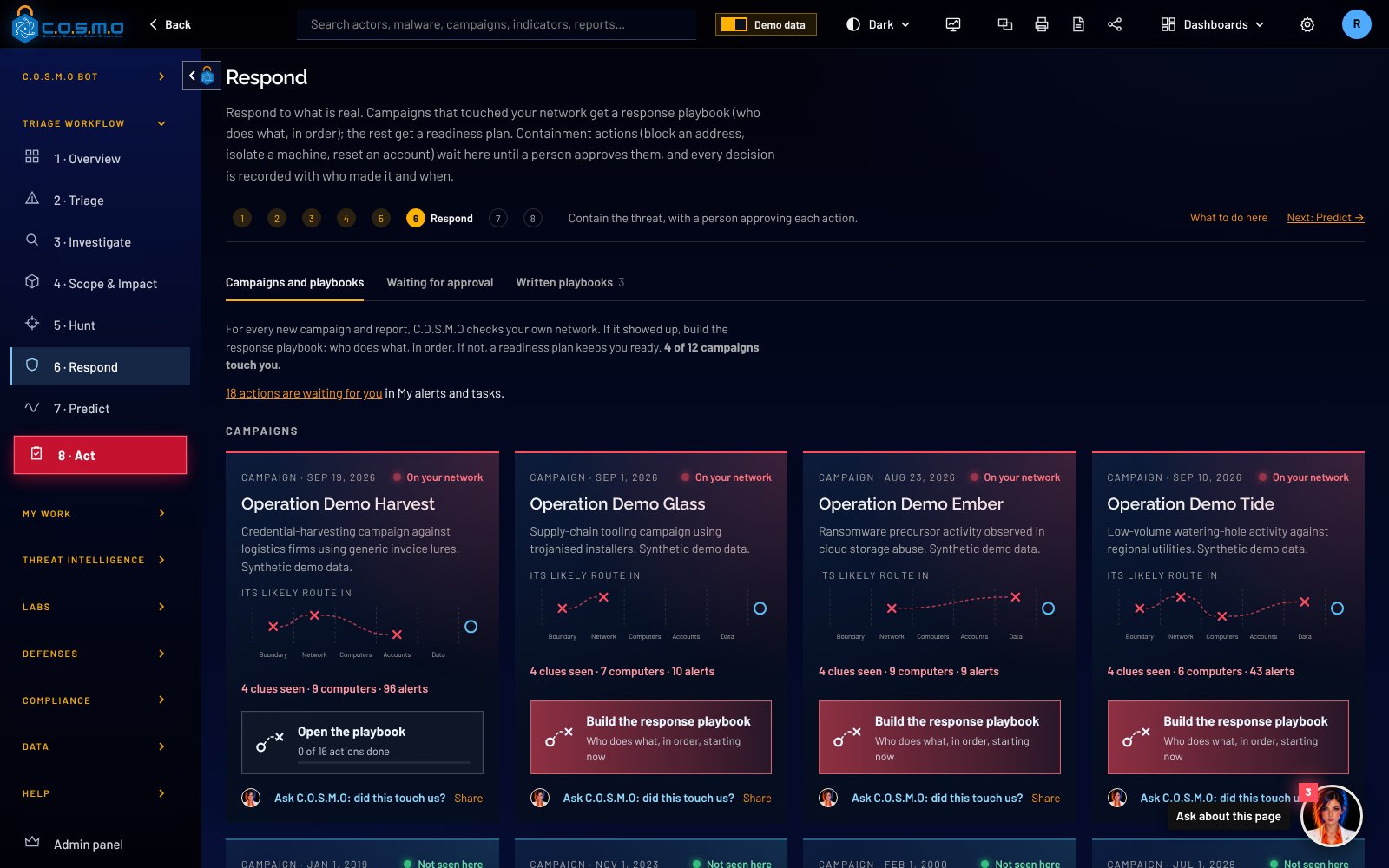
Playbooks draw the attacker’s likely route. Nothing is blocked or cut off until a person says so.

A response playbook: the attacker's likely route drawn as plays across your boundary, network, computers and accounts.

Malware Lab and the Constellation

09
You

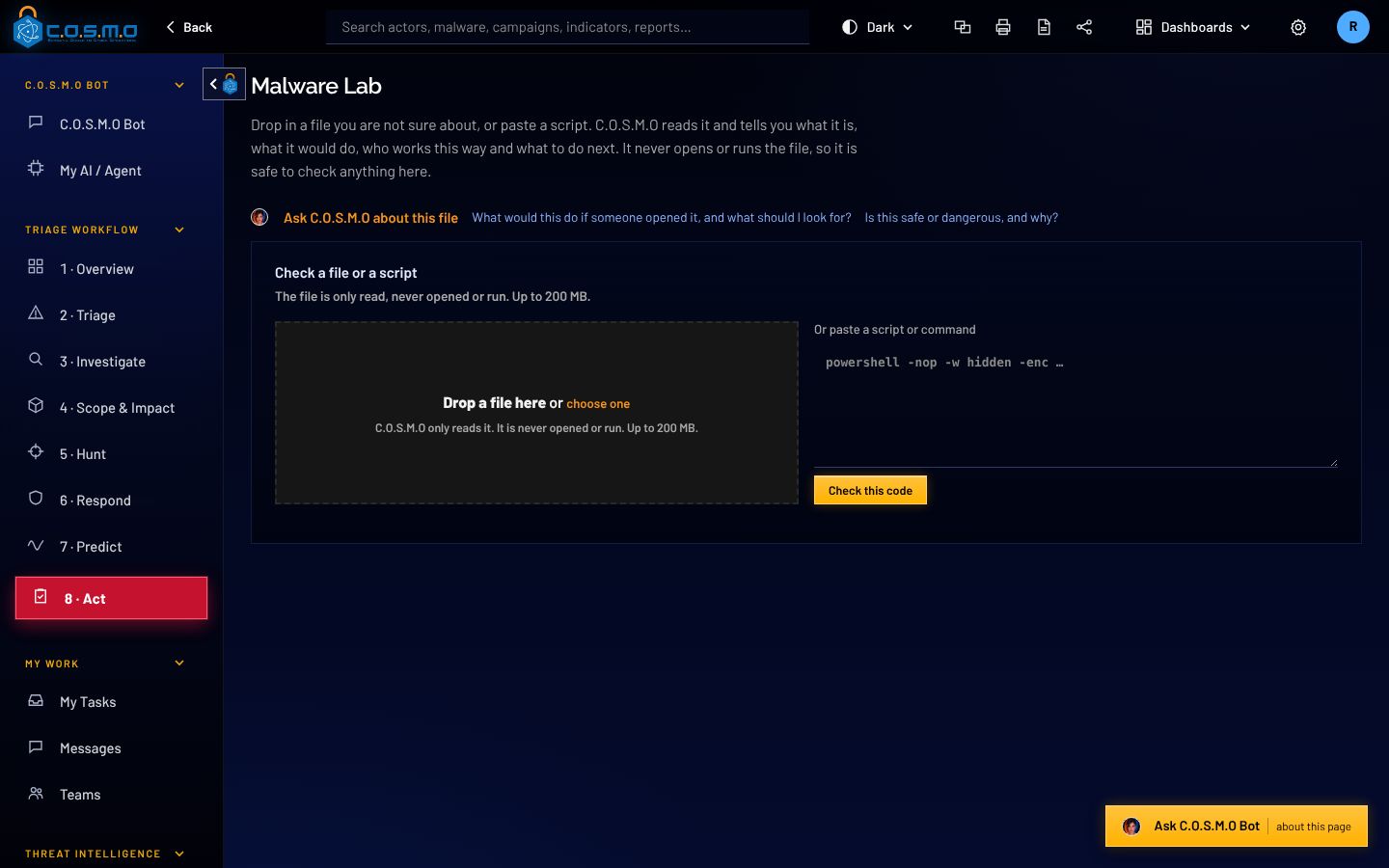
Drop in a suspicious file or script.

It is only read, never opened or run.

The Malware Lab: drop a file here, or paste a script or command. The file is only read, never opened or run.
10
C.O.S.M.O Bot and the council

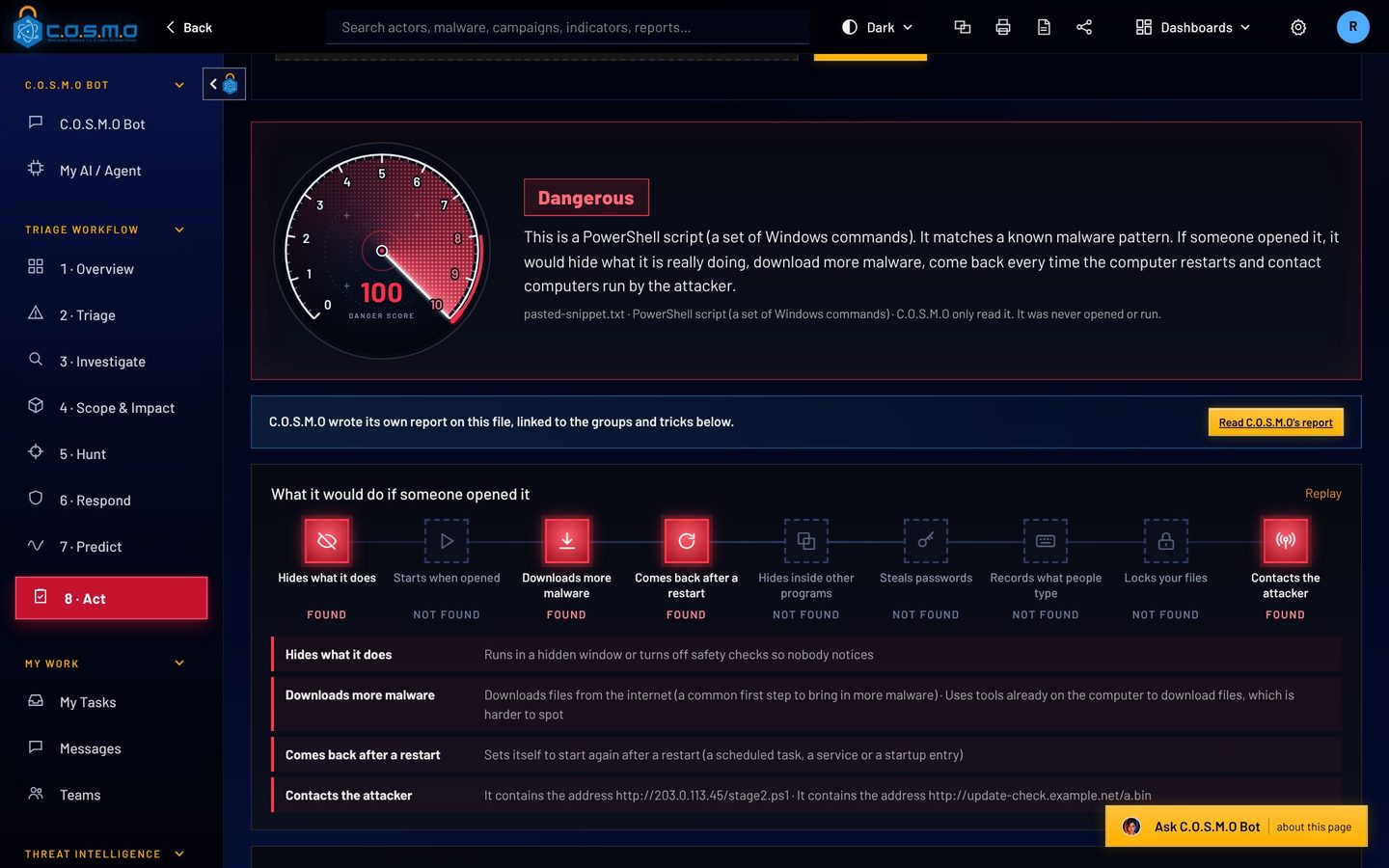
Explains it in plain English and writes the rules.

Five AI members read the code and vote. Rules are tested on the sample before they are offered.

A Malware Lab report: a danger score of 100 marked Dangerous and what the script would do if opened.

Hunt

11
C.O.S.M.O Bot

Suggests where to look for what no alert caught.

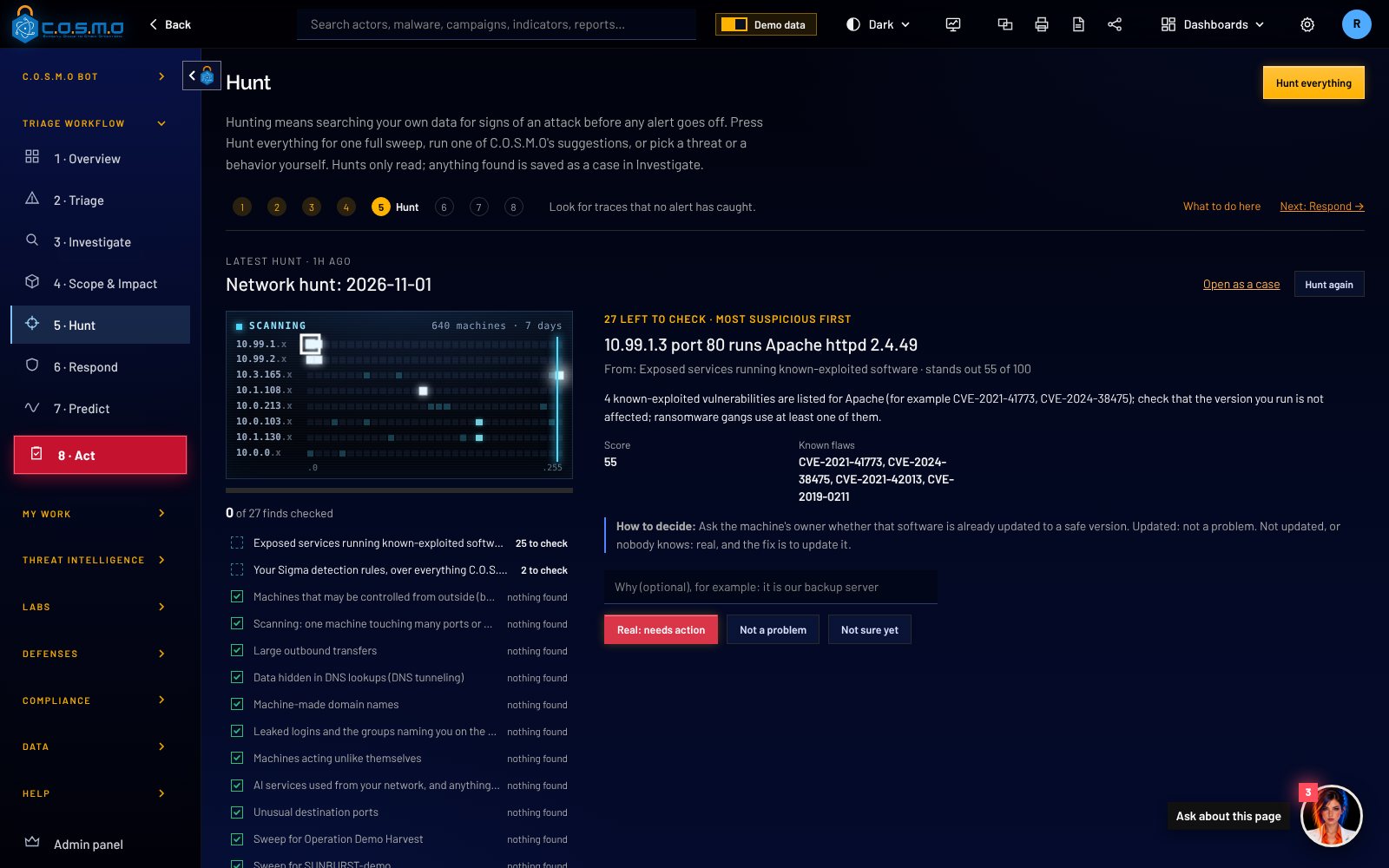
Sweeps for the groups and malware already in your queue. Every hunt only reads.

The Hunt page: where to look and for how long, and sweeps C.O.S.M.O suggests for named malware and groups.
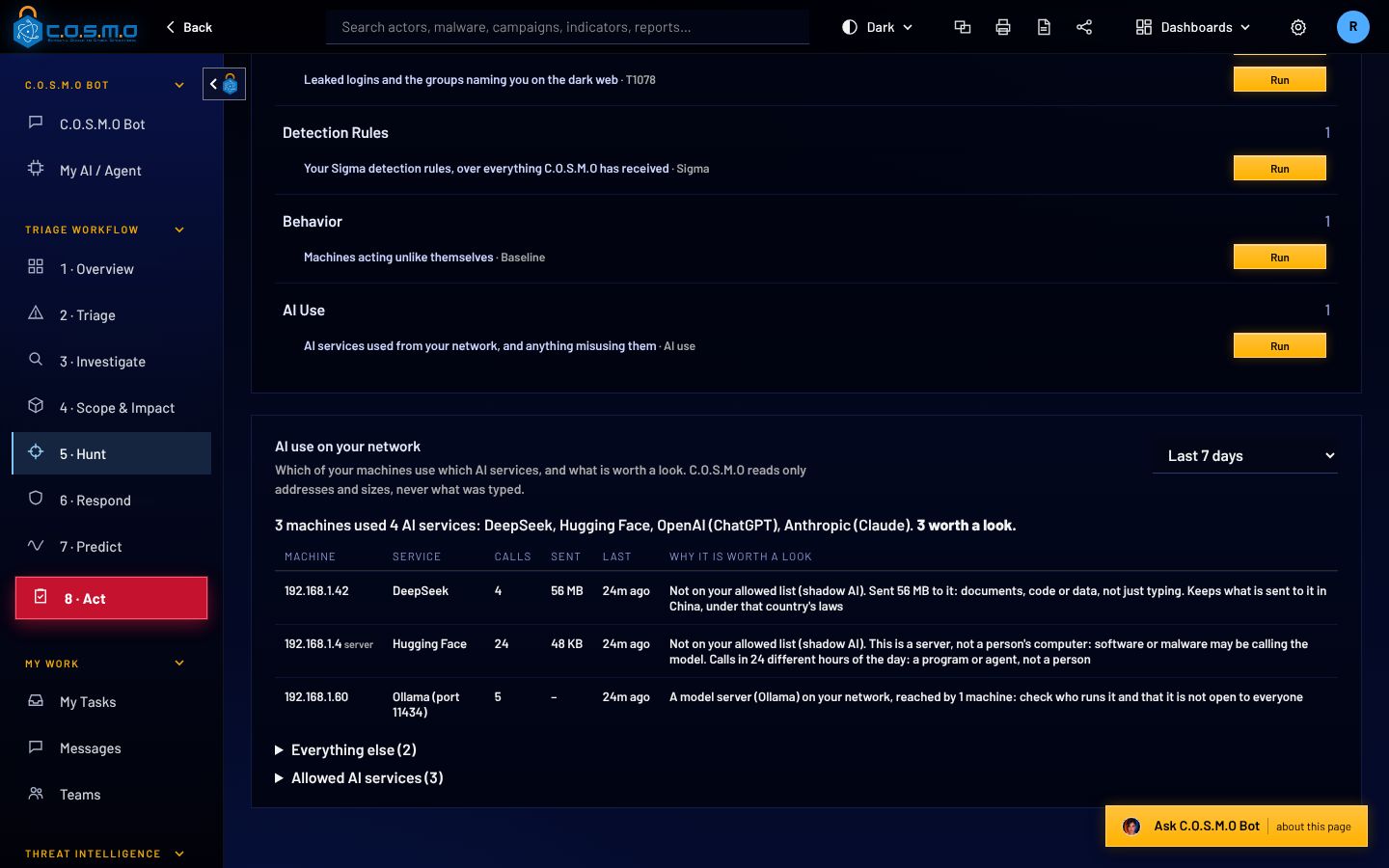
12
C.O.S.M.O Bot

Shows how AI services are used on your network.

Which machines call which services, and large uploads. Addresses, names and sizes, never what anyone typed.

AI use on your network: which machines used which AI services, how much they sent, and why each is worth a look.

Government and offline

13
You

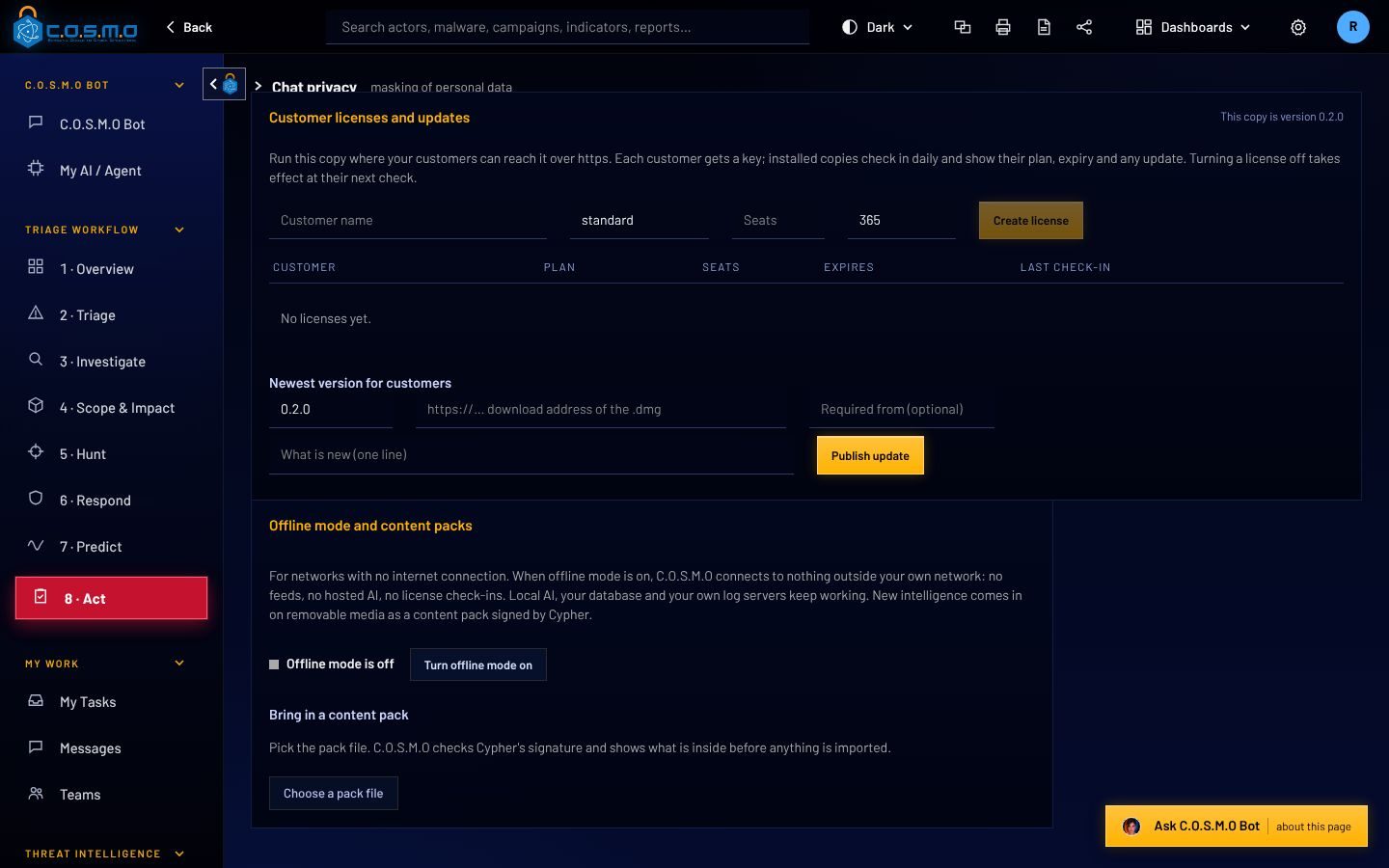
Bring updates in on removable media.

C.O.S.M.O checks the signature before anything is installed. In offline mode it opens no outside connection.

Offline mode and content packs: bring in a signed pack, checked before it is installed.

Real screenshots of C.O.S.M.O with fictional demo data.

Proof, not promises

Every answer comes with its working.

No black box. Press any score to see each point. Open any pack to see each file.

The score

Every score shows what went into it.

A real C.O.S.M.O alert: the risk score dial with severity, indicator confidence, earlier hits, known actors and what matched.
The work order

One PDF per team. Checklist first.

The top of a real C.O.S.M.O work order PDF for the firewall team: what to block, and a checklist for Palo Alto, FortiGate, Cisco ASA, pfSense, Linux and Windows firewalls.
  • 2026-11-01 1a Firewall team - work order.pdf
  • 2026-11-01 1a Firewall team - Palo Alto commands.txt
  • 2026-11-01 1a Firewall team work pack.zip

The top of a real work order PDF from the app. File names start with the date and the day’s batch.

Firewall commands for
  • Palo Alto
  • FortiGate
  • Cisco ASA
  • pfSense
  • iptables
  • Windows Firewall
Rules and searches in
  • Suricata
  • Sigma
  • YARA
  • Splunk SPL
  • Microsoft KQL

Plus a block list any firewall imports, a DNS block list, and machines, files and accounts to check.

The Constellation

Five AIs take malware apart. None of them runs it.

Drop a file or script into the Malware Lab and convene the council. Each member has one job. If you connect several AI models, each member can be a different one.

  • What it does, step by step, in plain English
  • The code, with comments above the lines that matter
  • Rules that also catch changed versions, tested on the sample
Confirmed by the line of codeSuspected: a member’s reading

With no AI connected, C.O.S.M.O still comments the code and builds the rules itself.

The Constellation: five AI members around the file they read. Polaris chairs. Vega reads the code, Orion works out what it does, Lyra writes the rules, Draco argues the other side. invoice-update.ps1only read, never run Polarischairs Vegareads the code Lyrawrites the rules Dracoargues the other side Orionworks out what it does
  • PolarisChair. Weighs the votes, writes the summary and the plan to stop the next version.
  • VegaCode reader. Reads every function line by line and writes the comments.
  • OrionBehavior analyst. Works out what the program does on a machine, step by step.
  • LyraDetection engineer. Picks what is hard for the author to change.
  • DracoSkeptic. Challenges every claim the code does not support.
One platform

Everything else a security team needs, in one place.

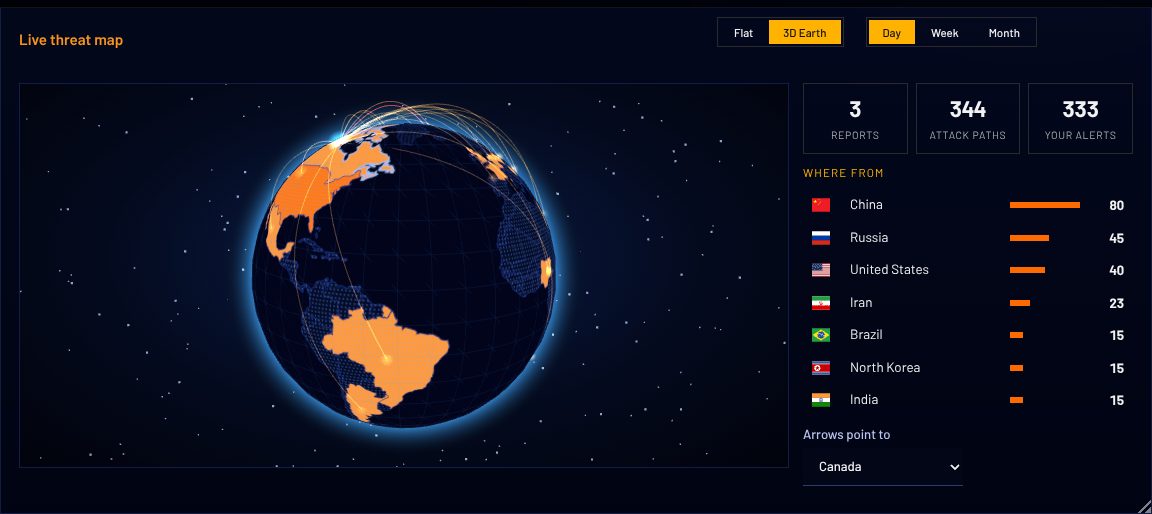
3D threat map

See where attacks come from.

Attack paths drawn to your network on a live 3D Earth.

The live threat map on a 3D Earth: attack paths in orange arcing toward North America.
Predict

Who is likely to come next, and why.

Proof of Defense

Rules tested, approved and retested.

Standards

Follows NIST, SOC 2 and OWASP, control by control.

Offline mode

Signed updates. No outside connection.

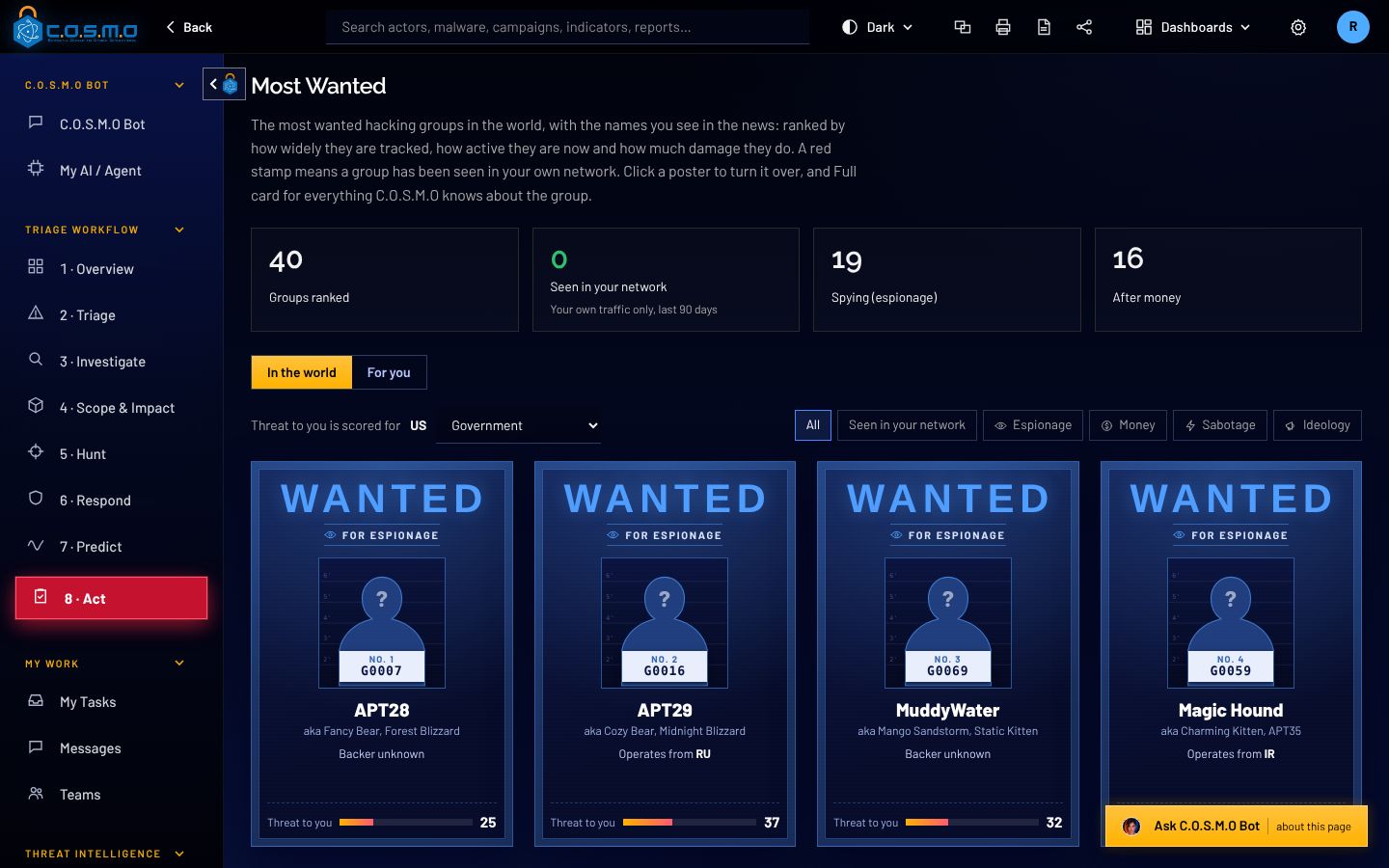
Most Wanted

The top hacking groups, stamped when seen on your network.

Most Wanted: hacking groups shown as wanted posters, with how much each threatens you.
Dark Web

Leak sites and forums, for the names you watch.

Respond

Playbooks where a person approves each action.

Threat Library

Groups, malware and campaigns, linked to attacker methods.

  • MITRE ATT&CK
  • STIX 2.1
  • CISA known exploited
  • TAXII
  • MISP
AI use on your network

Which machines call which AI services. Never what anyone typed.

C.O.S.M.O in numbers

6makes of firewall in every work pack
5rule and search formats, ready to paste
5AI members on the malware council
40incidents in one auto triage plan
30minutes before a change nobody confirmed lapses
0outside connections in offline mode
Runs anywhere, including offline

Your server, your network, your choice of AI.

C.O.S.M.O is one server and one database that you run. Nothing has to leave your network, and in offline mode nothing does.

Where C.O.S.M.O runs: data comes in from your firewalls, sensors, logs and threat feeds, or from signed content packs when offline. The C.O.S.M.O server and its database run inside your network. You choose which AI answers, or none. Work goes out to your teams.WHAT COMES INWHICH AI ANSWERS: YOUR CHOICEFirewalls and sensorsSyslog, CEF, Suricata and ZeekLogs and your toolsSplunk, Elasticsearch, SQL, S3, AzureThreat intelligenceRSS, TAXII, MISP and STIX filesSigned content packsOn removable media, when offlineGovernment cloud AIAzure Government, Bedrock, GSA USAiCommercial AIClaude or OpenAILocal modelsOllama, LM Studio, vLLM, llama.cppNo AI at allTriage, packs and rules still workYOUR NETWORKC.O.S.M.O serverWindows Server, Linux, macOS or Dockerwith its own PostgreSQL databaseYour teamsWork orders, work packs and My TasksOFFLINE MODE: ONLY LOCAL MODELSNo connection leaves your network.

What comes in

  • Firewalls and sensors
    Syslog, CEF, Suricata and Zeek
  • Logs and your tools
    Splunk, Elasticsearch, SQL, S3, Azure
  • Threat intelligence
    RSS, TAXII, MISP and STIX files
  • Signed content packs
    On removable media, when offline

Inside your network

  • C.O.S.M.O server
    Windows Server, Linux, macOS or Docker, with its own PostgreSQL database
  • Your teams
    Work orders, work packs and My Tasks

Which AI answers

  • Government cloud AI
    Azure Government, Bedrock, GSA USAi
  • Commercial AI
    Claude or OpenAI
  • Local models
    Ollama, LM Studio, vLLM, llama.cpp
  • No AI at all
    Triage, packs and rules still work
  • Offline mode
    Only local models. No connection leaves your network.

Install it where you work

Windows Server 2019, 2022 or 2025, Linux, macOS, or Docker and Podman on any VM or cloud. A team server people reach with only a browser.

Run it with no internet

Offline mode opens no outside connection. Intelligence and updates come in as signed files, checked before anything is installed.

Marked for government

Classification banners and portion markings, DoD sign-in rules, smart card sign-in and FIPS mode. How government mode works

How to buy

Buy C.O.S.M.O through Carahsoft.

C.O.S.M.O is available through Carahsoft, The Master Government Aggregator®, and its reseller partners and contract vehicles.

Talk to us first and we will set up a demo, help size it for your network, and point your contracting team to the right path.

Buy through Carahsoft

The Master Government Aggregator®, a Cypher partner.

  • Through Carahsoft’s reseller partners
  • Through Carahsoft’s contract vehicles
  • Demo and sizing from Cypher, LLC first

See C.O.S.M.O work a real queue.

We will walk you through auto triage, a team’s work pack and the Malware Lab on demo data, and talk through how it would sit on your network.

Cypher, LLC

C.O.S.M.O is built and supported by Cypher, LLC.

Cypher is a Service-Disabled Veteran-Owned Small Business, founded in 2009 and headquartered in Ashburn, Virginia. Its technical staff are 100% cleared and support customers onsite, across the Department of Defense, the Intelligence Community and civilian agencies.

Status
Service-Disabled Veteran-Owned Small Business (SDVOSB)
Founded
2009
Address
44679 Endicott Dr, Suite 314
Ashburn, VA 20147
CAGE
6ZPW9
UEI
UVKETSQ7AQG3
Phone
(571) 206-1401